Chapter 7 Arrays and Vectors
7.1 Arrays Hold Multiple Values
Concept:
An array allows you to store and work with multiple values of the same data type.
Variables you have used so far only hold one value at a time.
An array acts like a variable that can store a group of values, all of the same data type, in consecutive memory locations.
int days[6];In the definition above,
daysis the array’s name.The number in the brackets,
6, is the size declarator, indicating the number of elements the array can hold.An array’s size declarator must be a constant integer expression greater than zero. It can be a literal or a named constant.
const int NUM_DAYS = 6;
int days[NUM_DAYS];- Arrays can be defined for any data type.
float temperatures[100];
string names[10];
long units[50];
double sizes[1200];
Memory Requirements of Arrays
- The amount of memory an array uses depends on its data type and the number of elements.
- For example, an array of six
shorts, where eachshortuses 2 bytes, would occupy 12 bytes.
short hours[6];- The total size of an array can be calculated by multiplying the size of one element by the total number of elements.
| Array Definition | Number of Elements | Size of Each Element | Size of the Array |
|---|---|---|---|
char letters[25]; |
25 | 1 byte | 25 bytes |
short rings[100]; |
100 | 2 bytes | 200 bytes |
int miles[84]; |
84 | 4 bytes | 336 bytes |
float temp[12]; |
12 | 4 bytes | 48 bytes |
double distance[1000]; |
1000 | 8 bytes | 8000 bytes |
7.2 Accessing Array Elements
Concept:
The individual elements of an array are assigned unique subscripts. These subscripts are used to access the elements.
- Array elements can be accessed individually using a number called a subscript, which acts as an index.
- Subscripts start at 0 for the first element, 1 for the second, and so on. The six elements in the
hoursarray would have subscripts 0 through 5.
Note:
- In C++, subscript numbering always starts at 0.
- The subscript of the last element is always one less than the total number of elements. For an array
hours[6], the last element ishours[5].
- Each element, accessed by its subscript, can be used like a regular variable of that type.
hours[0] = 20;Note:
- The expression
hours[0]is pronounced “hours sub zero.”
Note:
- If an array is defined globally, its elements are initialized to zero by default.
- Local arrays have no default initialization value; their elements contain “garbage” until assigned.
- The following statement stores 30 in the fourth element of the array.
hours[3] = 30;Note:
- The number in an array’s definition is the size declarator. The number in brackets used in other statements is a subscript.
Inputting and Outputting Array Contents
- Array elements can be used with
cinandcoutjust like other variables. - Program 7-1 demonstrates storing and displaying user-entered values in an array.
🗊 Program 7-1
 #include <iostream>
 using namespace std;

 int main()
 {
     const int NUM_EMPLOYEES = 6;
     int hours[NUM_EMPLOYEES];

     cout << "Enter the hours worked by "
          << NUM_EMPLOYEES << " employees: ";
     cin >> hours[0];
     cin >> hours[1];
     cin >> hours[2];
     cin >> hours[3];
     cin >> hours[4];
     cin >> hours[5];

     cout << "The hours you entered are:";
     cout << " " << hours[0];
     cout << " " << hours[1];
     cout << " " << hours[2];
     cout << " " << hours[3];
     cout << " " << hours[4];
     cout << " " << hours[5] << endl;
     return 0;
 }
💻 Program Output
- While the size declarator must be a constant, a subscript can be a variable. This allows using a loop to iterate through an array.
const int ARRAY_SIZE = 5;
int numbers[ARRAY_SIZE];

for (int count = 0; count < ARRAY_SIZE; count++)
   numbers[count] = 99;
Accessing Array Elements with a Loop
The code above defines a 5-element array and uses a
forloop to assign the value 99 to each element.The loop’s counter variable,
count, is used as the subscript, iterating through all valid subscript values (0 through 4).Program 7-1 can be simplified by using
forloops to handle input and output, as shown in Program 7-2.
🗊 Program 7-2
 #include <iostream>
 using namespace std;

 int main()
 {
     const int NUM_EMPLOYEES = 6;
     int hours[NUM_EMPLOYEES];
     int count;

     for (count = 0; count < NUM_EMPLOYEES; count++)
     {
         cout << "Enter the hours worked by employee "
              << (count + 1) << ": ";
         cin >> hours[count];
      }

      cout << "The hours you entered are:";
      for (count = 0; count < NUM_EMPLOYEES; count++)
         cout << " " << hours[count];
      cout << endl;
      return 0;
 }
💻 Program Output
- In the first loop,
count + 1is used to display a 1-based employee number, whilecountis used for the 0-based array subscript.
Note:
- Any integer expression can be used as an array subscript, such as
count - 1.
- You must input and output array data one element at a time, typically with a loop.
- Statements like
cin >> hours;orcout << hours;will not work as intended.
Array Initialization
- C++ allows initializing an array’s elements at the time of its definition using an initialization list.
const int MONTHS = 12;
int days[MONTHS] = {31, 28, 31, 30, 31, 30, 31, 31, 30, 31, 30, 31};
Values from the list are assigned to array elements in order, starting from the first element (subscript 0).
Program 7-3 demonstrates initializing an array of integers.
🗊 Program 7-3
💻 Program Output
Note:
- An initialization list can be spread across multiple lines for readability.
- Program 7-4 shows an example of initializing a
stringarray.
🗊 Program 7-4
 #include<iostream>
 #include<string>
 using namespace std;

 int main()
 {
    const int SIZE = 9;
    string planets[SIZE] = { "Mercury", "Venus", "Earth", "Mars",
                           "Jupiter", "Saturn", "Uranus",
                           "Neptune", "Pluto (a dwarf planet)" };

    cout << "Here are the planets:\n";

    for (int count = 0; count < SIZE; count++)
       cout << planets[count] << endl;
    return 0;
 }
💻 Program Output
- Program 7-5 demonstrates initializing a character array.
🗊 Program 7-5
 #include <iostream>
 using namespace std;

 int main()
 {
     const int NUM_LETTERS = 10;
     char letters[NUM_LETTERS] = {'A', 'B', 'C', 'D', 'E',
                                  'F', 'G', 'H', 'I', 'J'};

     cout << "Character" << "\t" << "ASCII Code\n";
     cout << "---------" << "\t" << "----------\n";
     for (int count = 0; count < NUM_LETTERS; count++)
     {
        cout << letters[count] << "\t\t";
        cout << static_cast<int>(letters[count]) << endl;
     }
     return 0;
 }
💻 Program Output
Note:
- An array’s initialization list cannot contain more values than the number of elements in the array.
Partial Array Initialization
- You can initialize only the first few elements of an array.
int numbers[7] = {1, 2, 4, 8};- If an array is partially initialized, the remaining uninitialized elements are automatically set to zero (or empty strings for
stringarrays). This applies even to local arrays.
🗊 Program 7-6
💻 Program Output
- You cannot skip elements in an initialization list. All uninitialized elements must come after the initialized ones.
Implicit Array Sizing
- You can define an array without specifying its size if you provide an initialization list. C++ will automatically size the array to fit the list.
double ratings[] = {1.0, 1.5, 2.0, 2.5, 3.0};Note:
- You must provide an initialization list if you omit the array’s size declarator.
Reading Data from a File into an Array
- To read data from a file into an array, open the file and use a loop to read each item, storing it in an array element. The loop should stop when the array is full or the end of the file is reached.
🗊 Program 7-7
 #include <iostream>
 #include <fstream>
 using namespace std;

 int main()
 {
     const int ARRAY_SIZE = 10;
     int numbers[ARRAY_SIZE];
     int count = 0;
     ifstream inputFile;

     inputFile.open("TenNumbers.txt");

     while (count < ARRAY_SIZE && inputFile >> numbers[count])
         count++;

     inputFile.close();

     cout << "The numbers are: ";
     for (count = 0; count < ARRAY_SIZE; count++)
         cout << numbers[count] << " ";
     cout << endl;
     return 0;
 }
💻 Program Output
- The
whileloop’s conditioncount < ARRAY_SIZE && inputFile >> numbers[count]ensures two things:- It prevents writing past the end of the array.
- It stops if a value cannot be read from the file (e.g., end of file).
Writing the Contents of an Array to a File
- To write an array’s contents to a file, use a loop to iterate through each element and write its value to the file.
🗊 Program 7-8
 #include <iostream>
 #include <fstream>
 using namespace std;

 int main()
 {
     const int ARRAY_SIZE = 10;
     int numbers[ARRAY_SIZE];
     int count;
     ofstream outputFile;

     for (count = 0; count < ARRAY_SIZE; count++)
        numbers[count] = count;

     outputFile.open("SavedNumbers.txt");

     for (count = 0; count < ARRAY_SIZE; count++)
        outputFile << numbers[count] << endl;

     outputFile.close();

     cout << "The numbers were saved to the file.\n ";
     return 0;
 }
💻 Program Output
Contents of the File SavedNumbers.txt
7.3 No Bounds Checking in C++
Concept:
C++ does not prevent you from overwriting an array’s bounds.
- To improve runtime efficiency, C++ does not perform array bounds checking.
- This means a program can use subscripts that go beyond the boundaries of an array, potentially accessing or corrupting other memory.
Warning!
Program 7-9 will attempt to write to an area of memory outside the array. This is an invalid operation and will most likely cause the program to crash.
🗊 Program 7-9
 #include <iostream>
 using namespace std;

 int main()
 {
     const int SIZE = 3;
     int values[SIZE];
     int count;

     cout << "I will store 5 numbers in a 3-element array!\n";
     for (count = 0; count < 5; count++)
         values[count] = 100;

     cout << "If you see this message, it means the program\n";
     cout << "has not crashed! Here are the numbers:\n";
     for (count = 0; count < 5; count++)
         cout << values[count] << endl;
     return 0;
 }
In the program above, the
valuesarray has valid subscripts 0, 1, and 2. The loop attempts to access elements 3 and 4, which do not exist. C++ allows this, leading to undefined behavior.The lack of safeguards like bounds checking means programmers must be careful to ensure all array access is within valid boundaries.
Watch for Off-by-One Errors
- An off-by-one error is a common mistake when working with arrays, often caused by forgetting that subscripts start at 0.
- The following code demonstrates an off-by-one error.
const int SIZE = 100;
int numbers[SIZE];
for (int count = 1; count <= SIZE; count++)
numbers[count] = 0;- The loop incorrectly iterates from 1 to 100. This skips the first element (
numbers[0]) and attempts to access an invalid element (numbers[100]), writing beyond the array’s boundary.
Checkpoint
7.1 Define the following arrays:
empNums, a 100-element array ofintspayRates, a 25-element array offloatsmiles, a 14-element array oflongscityName, a 26-element array ofstringobjectslightYears, a 1,000-element array ofdoubles
7.2 What’s wrong with the following array definitions?
int readings[-1];
float measurements[4.5];
int size;
string names[size];
7.3 What would the valid subscript values be in a 4-element array of
doubles?7.4 What is the difference between an array’s size declarator and a subscript?
7.5 What is “array bounds checking”? Does C++ perform it?
7.6 What is the output of the following code?
int values[5], count;
for (count = 0; count < 5; count++)
    values[count] = count + 1;
for (count = 0; count < 5; count++)
    cout << values[count] << endl;
7.7 The following program skeleton contains a 20-element array of
ints calledfish. When completed, the program should ask how many fish were caught by fishermen 1 through 20, and store this data in the array. Complete the program.#include <iostream> using namespace std; int main() { const int NUM_FISH = 20; int fish[NUM_FISH]; return 0; }7.8 Define the following arrays:
ages, a 10-element array of ints initialized with the values 5, 7, 9, 14, 15, 17, 18, 19, 21, and 23.
temps, a 7-element array of floats initialized with the values 14.7, 16.3, 18.43, 21.09, 17.9, 18.76, and 26.7.
alpha, an 8-element array of chars initialized with the values ‘J’, ‘B’, ‘L’, ‘A’, ‘*’, ‘$’, ‘H’, and ‘M’.
7.9 Is each of the following a valid or invalid array definition? (If a definition is invalid, explain why.)
int numbers[10] = {0, 0, 1, 0, 0, 1, 0, 0, 1, 1};int matrix[5] = {1, 2, 3, 4, 5, 6, 7};double radii[10] = {3.2, 4.7};int table[7] = {2, , , 27, , 45, 39};char codes[] = {'A', 'X', '1', '2', 's'};int blanks[];
7.4 The Range-Based for Loop
Concept:
The range-based for loop is a loop that iterates once for each element in an array. Each time the loop iterates, it copies an element from the array to a variable. The range-based for loop was introduced in C++ 11.
- C++ 11 introduced the range-based for loop, which simplifies array processing.
- It automatically iterates once for each element in an array, so you don’t need a counter variable or worry about array bounds.
- Each iteration, it copies an array element into a built-in range variable.
Here is the general format of the range-based for loop:
for (dataType rangeVariable : array)
statement;dataType: The data type of the range variable, which should match the array’s element type.rangeVariable: The name of the variable that will receive a copy of an array element’s value during each iteration.array: The name of the array to iterate over.statement: The statement(s) to execute for each element.
For example, with the array:
int numbers[] = { 3, 6, 9 };You can use this loop to display its contents:
for (int val : numbers)
cout << val << endl;- The loop iterates three times. In each iteration,
valholds the value ofnumbers[0], thennumbers[1], thennumbers[2]. - You can use the
autokeyword to let the compiler deduce the range variable’s data type.
for (auto val : numbers)
cout << val << endl;- Program 7-10 demonstrates the range-based
forloop with anintarray.
🗊 Program 7-10
💻 Program Output
- Program 7-11 shows an example with a
stringarray.
🗊 Program 7-11
💻 Program Output
Modifying an Array with a Range-Based for Loop
- By default, the range variable contains a copy of an array element, so modifying it does not change the original array.
- To modify the array’s contents, you must declare the range variable as a reference by placing an ampersand (
&) before its name.
🗊 Program 7-12
💻 Program Output
- In the first loop (line 12),
valis a reference (&val), so changes made tovaldirectly affect the elements in thenumbersarray. - In the second loop (line 20),
valis a regular variable (a copy), which is sufficient for just displaying the values.
The Range-Based for Loop versus the Regular for Loop
- Use the range-based
forloop when you need to iterate through all elements of an array but do not need access to the element’s subscript. - Use a regular
forloop when you need the subscript for some purpose.
Note:
- You can use the
autokeyword with a reference range variable, for example:for (auto &val : numbers).
7.5 Processing Array Contents
Concept:
Individual array elements are processed like any other type of variable.
- Array elements can be used in expressions just like regular variables.
pay = hours[3] * rate;- You can also apply increment and decrement operators to them.
int score[5] = {7, 8, 9, 10, 11};
++score[2];
score[4]++;
Note:
- Be careful not to confuse the subscript with the element’s value.
amount[count--]decrementscount, whileamount[count]--decrements the value stored atamount[count].
- Program 7-13 demonstrates using array elements in mathematical calculations.
🗊 Program 7-13
 #include <iostream>
 #include <iomanip>
 using namespace std;

 int main()
 {
     const int NUM_EMPLOYEES = 5;
     int hours[NUM_EMPLOYEES];
     double payrate;
     double grossPay;

     cout << "Enter the hours worked by ";
     cout << NUM_EMPLOYEES << " employees who all\n";
     cout << "earn the same hourly rate.\n";
     for (int index = 0; index < NUM_EMPLOYEES; index++)
     {
         cout << "Employee #" << (index + 1) << ": ";
         cin >> hours[index];
     }

     cout << "Enter the hourly pay rate for all the employees:  ";
     cin >> payrate;

     cout << "Here is the gross pay for each employee:\n";
     cout << fixed << showpoint << setprecision(2);
     for (int index = 0; index < NUM_EMPLOYEES; index++)
     {
         grossPay = hours[index] * payrate;
         cout << "Employee #" << (index + 1);
         cout << ": $" << grossPay << endl;
     }
     return 0;
 }
💻 Program Output
- Array elements can also be used in relational expressions, such as in
ifstatements orwhileloops.
Thou Shall Not Assign
- You cannot assign one entire array to another using the assignment operator (
=).
newValues = oldValues; - To copy an array, you must use a loop to assign the individual elements one by one.
for (int count = 0; count < SIZE; count++)
newValues[count] = oldValues[count];- This is because an array’s name, when used without brackets, represents its starting memory address. The assignment
newValues = oldValuesis an attempt to changenewValues’s memory address, which is not allowed.
| Expression | Value |
|---|---|
oldValues[0] |
10 (Contents of Element 0 of oldValues) |
oldValues[1] |
100 (Contents of Element 1 of oldValues) |
oldValues[2] |
200 (Contents of Element 2 of oldValues) |
oldValues[3] |
300 (Contents of Element 3 of oldValues) |
newValues |
8012 (Memory Address of newValues) |
oldValues |
8024 (Memory Address of oldValues) |
Printing the Contents of an Array
- For the same reason, you cannot print an array’s contents with a single
coutstatement.
cout << numbers << endl; - This will print the array’s memory address, not its elements.
- You must use a loop to display each element individually. A regular
forloop or a range-basedforloop can be used.
Summing the Values in a Numeric Array
- To sum the values in an array, use a loop and an accumulator variable, adding each element’s value to the accumulator.
int total = 0;
for (int count = 0; count < NUM_UNITS; count++)
total += units[count];- With C++ 11, you can also use a range-based
forloop.
int total = 0;
for (int val : units)
    total += val;
Note:
- An accumulator variable must always be initialized to 0 before starting the sum.
Getting the Average of the Values in a Numeric Array
- To find the average of values in an array, first sum all the values, then divide the sum by the number of elements.
double total = 0;
double average;
for (int count = 0; count < NUM_SCORES; count++)
    total += scores[count];
average = total / NUM_SCORES;- The division should be performed only once, after the loop has finished summing all the elements.
- This can also be done using a range-based
forloop for the summation part.
Finding the Highest and Lowest Values in a Numeric Array
- To find the highest value:
- Initialize a
highestvariable with the value of the first array element. - Loop through the rest of the array (from the second element onward).
- If an element’s value is greater than
highest, updatehighestwith that element’s value.
- Initialize a
int count;
int highest;
highest = numbers[0];
for (count = 1; count < SIZE; count++)
{
   if (numbers[count] > highest)
      highest = numbers[count];
}- The logic for finding the lowest value is similar, but you compare using the
<operator.
int count;
int lowest;
lowest = numbers[0];
for (count = 1; count < SIZE; count++)
{
   if (numbers[count] < lowest)
      lowest = numbers[count];
}
Partially Filled Arrays
- When you don’t know exactly how many items will be stored, you can create a large array and use a separate integer variable to keep track of how many elements are actually in use.
- Each time you add an item to the array, you increment this counter variable.
const int SIZE = 100;
int numbers[SIZE];
int count = 0;- When processing the array, use the counter variable to control the loop, ensuring you only access elements with valid data.
for (int index = 0; index < count; index++)
{
   cout << numbers[index] << endl;
}- Program 7-14 demonstrates reading an unknown number of items from a file into a partially filled array.
🗊 Program 7-14
 #include <iostream>
 #include <fstream>
 using namespace std;

 int main()
 {
     const int ARRAY_SIZE = 100;
     int numbers[ARRAY_SIZE];
     int count = 0;
     ifstream inputFile;

     inputFile.open("numbers.txt");

     while (count < ARRAY_SIZE && inputFile >> numbers[count])
         count++;

     inputFile.close();

     cout << "The numbers are: ";
     for (int index = 0; index < count; index++)
         cout << numbers[index] << " ";
     cout << endl;
     return 0;
 }
💻 Program Output
Comparing Arrays
- You cannot use the
==operator to compare the contents of two arrays.
if (firstArray == secondArray) - This operator compares the arrays’ starting memory addresses, not their element values. Since two different arrays will have different addresses, this will always be false.
- To compare two arrays, you must use a loop to compare their corresponding elements one by one.
- A common algorithm uses a boolean flag, initially set to
true, and sets it tofalseif any non-matching elements are found.
const int SIZE = 5;
int firstArray[SIZE] = { 5, 10, 15, 20, 25 };
int secondArray[SIZE] = { 5, 10, 15, 20, 25 };
bool arraysEqual = true;
int count = 0;
 while (arraysEqual && count < SIZE)
{
   if (firstArray[count] != secondArray[count])
      arraysEqual = false;
   count++;
}
if (arraysEqual)
   cout << "The arrays are equal.\n";
else
   cout << "The arrays are not equal.\n";
7.6 Focus on Software Engineering: Using Parallel Arrays
Concept:
By using the same subscript, you can build relationships between data stored in two or more arrays.
- It is often useful to store related data in two or more separate arrays, especially when the data types are different.
- These are called parallel arrays because the same subscript can be used to access related data across them.
- For example, one array can store employee hours (
int), and another can store their pay rates (double).
🗊 Program 7-15
 #include <iostream>
 #include <iomanip>
 using namespace std;

 int main()
 {
     const int NUM_EMPLOYEES = 5;
     int hours[NUM_EMPLOYEES];
     double payRate[NUM_EMPLOYEES];

     cout << "Enter the hours worked by " << NUM_EMPLOYEES
          << " employees and their\n"
          << "hourly pay rates.\n";
     for (int index = 0; index < NUM_EMPLOYEES; index++)
     {
         cout << "Hours worked by employee #" << (index+1) << ": ";
         cin >> hours[index];
         cout << "Hourly pay rate for employee #" << (index+1) << ": ";
         cin >> payRate[index];
     }

     cout << "Here is the gross pay for each employee:\n";
     cout << fixed << showpoint << setprecision(2);
     for (int index = 0; index < NUM_EMPLOYEES; index++)
     {
         double grossPay = hours[index] * payRate[index];
         cout << "Employee #" << (index + 1);
         cout << ": $" << grossPay << endl;
     }
     return 0;
 }
💻 Program Output
- In the program, the same subscript (
index) is used to access bothhours[index]andpayRate[index]. - This works because the data for a single employee is stored at the same relative position in each array. For example, employee https://www.google.com/search?q=%231’s data is at
hours[0]andpayRate[0].
Checkpoint
7.10 Given the following array definition:
int values[] = {2, 6, 10, 14};What does each of the following display?
cout << values[2];cout << ++values[0];cout << values[1]++;x = 2;cout << values[++x];
7.11 Given the following array definition:
int nums[5] = {1, 2, 3};What will the following statement display?
cout << nums[3];7.12 What is the output of the following code? (You may need to use a calculator.)
double balance[5] = {100.0, 250.0, 325.0, 500.0, 1100.0};
const double INTRATE = 0.1;

cout << fixed << showpoint << setprecision(2);
for (int count = 0; count < 5; count++)
    cout << (balance[count] * INTRATE) << endl;
7.13 What is the output of the following code? (You may need to use a calculator.)
const int SIZE = 5;
int time[SIZE] = {1, 2, 3, 4, 5},
    speed[SIZE] = {18, 4, 27, 52, 100},
    dist[SIZE];
for (int count = 0; count < SIZE; count++)
    dist[count] = time[count] * speed[count];
for (int count = 0; count < SIZE; count++)
{
    cout << time[count] << " ";
    cout << speed[count] << " ";
    cout << dist[count] << endl;
}
7.7 Arrays as Function Arguments
Concept:
To pass an array as an argument to a function, pass the name of the array.
Passing an Array to a Function
- Functions are often used to process data in arrays, such as filling an array, displaying its contents, or calculating totals and averages.
- When a single array element is passed to a function, it is passed by value, just like any other variable.
🗊 Program 7-16
💻 Program Output
- To pass an entire array to a function, the function parameter is declared with empty brackets
[]to indicate it accepts an array.
void showValues(int nums[], int size)
{
   for (int index = 0; index < size; index++)
       cout << nums[index] << " ";
   cout << endl;
}- When an entire array is passed, it is not passed by value. Instead, only the starting memory address of the array is passed. This is a form of pass-by-reference and is much more efficient than copying a large array.
🗊 Program 7-17
 #include <iostream>
 using namespace std;

 void showValues(int [], int);

 int main()
 {
     const int ARRAY_SIZE = 8;
     int numbers[ARRAY_SIZE] = {5, 10, 15, 20, 25, 30, 35, 40};

     showValues(numbers, ARRAY_SIZE);
     return 0;
 }


 void showValues(int nums[], int size)
 {
     for (int index = 0; index < size; index++)
         cout << nums[index] << " ";
     cout << endl;
 }
💻 Program Output
In the function call
showValues(numbers, ARRAY_SIZE);, the namenumbers(without brackets) represents the array’s beginning memory address.The function’s parameter
numsreceives this address and can then be used to access and work with the originalnumbersarray.Because the function parameter can accept the address of any integer array, a single function can be used to process multiple different arrays.
🗊 Program 7-18
 #include <iostream>
 using namespace std;

 void showValues(int [], int);

 int main()
 {
     const int SIZE1 = 8;
     const int SIZE2 = 5;
     int set1[SIZE1] = {5, 10, 15, 20, 25, 30, 35, 40};
     int set2[SIZE2] = {2, 4, 6, 8, 10};

     showValues(set1, SIZE1);

     showValues(set2, SIZE2);
     return 0;
 }


 void showValues(int nums[], int size)
 {
     for (int index = 0; index < size; index++)
         cout << nums[index] << " ";
     cout << endl;
 }
💻 Program Output
- Since array parameters give the function direct access to the original array, any changes made to the array within the function will affect the original array in the calling function.
🗊 Program 7-19
 #include <iostream>
 using namespace std;

 void doubleArray(int [], int);
 void showValues(int [], int);

 int main()
 {
     const int ARRAY_SIZE = 7;
     int set[ARRAY_SIZE] = {1, 2, 3, 4, 5, 6, 7};

     cout << "The array's values are:\n";
     showValues(set, ARRAY_SIZE);

     doubleArray(set, ARRAY_SIZE);

     cout << "After calling doubleArray the values are:\n";
     showValues(set, ARRAY_SIZE);

     return 0;
 }


 void doubleArray(int nums[], int size)
 {
     for (int index = 0; index < size; index++)
         nums[index] *= 2;
 }


 void showValues(int nums[], int size)
 {
     for (int index = 0; index < size; index++)
         cout << nums[index] << " ";
     cout << endl;
 }
💻 Program Output
Using const Array Parameters
- To prevent a function from modifying an array argument, use the
constkeyword in the parameter declaration. - This is a good practice for functions that are only intended to read from an array, not change it.
- If code within the function attempts to modify a
constarray parameter, a compile-time error will occur.
void showValues(const int nums[], int size)
{
    for (int index = 0; index < size; index++)
        cout << nums[index] << " ";
    cout << endl;
}
In the Spotlight:
Processing an Array
- This case study involves a program to calculate a student’s average test score after dropping the lowest score.
- Algorithm:
- Read four test scores.
- Calculate the total of the scores.
- Find the lowest score.
- Subtract the lowest score from the total.
- Divide the new total by 3 to get the average.
- Display the average.
- The program is modularized, using separate functions to get the scores, calculate the total, and find the lowest value.
🗊 Program 7-20 (main function)
 #include <iostream>
 #include <iomanip>
 using namespace std;

 void getTestScores(double[], int);
 double getTotal(const double[], int);
 double getLowest(const double[], int);

 int main()
 {
     const int SIZE = 4;
     double testScores[SIZE],
            total,
            lowestScore,
            average;

     cout << fixed << showpoint << setprecision(1);

     getTestScores(testScores, SIZE);

     total = getTotal(testScores, SIZE);

     lowestScore = getLowest(testScores, SIZE);

     total -= lowestScore;

     average = total / (SIZE - 1);

     cout << "The average with the lowest score "
          << "dropped is " << average << ".\n";

     return 0;
}- The
getTestScoresfunction prompts the user to enter the test scores and stores them in an array.
🗊 Program 7-20 (getTestScores function)
- The
getTotalfunction accepts an array and returns the sum of its elements. The array parameter isconstbecause the function does not modify it.
🗊 Program 7-20 (getTotal function)
- The
getLowestfunction accepts an array and returns the lowest value it contains. This parameter is alsoconst.
🗊 Program 7-20 (getLowest function)
🗊 Program 7-20 Program Output with Example Input Shown in Bold
Checkpoint
7.14 Given the following array definitions:
double array1[4] = {1.2, 3.2, 4.2, 5.2};
double array2[4];
Will the following statement work? If not, why?
array2 = array1;7.15 When an array name is passed to a function, what is actually being passed?
7.16 When used as function arguments, are arrays passed by value?
7.17 What is the output of the following program? (You may need to consult the ASCII table in Appendix A.)
#include <iostream>
using namespace std;
void fillArray(char [], int);
void showArray(const char [], int);
int main ()
{
   const int SIZE = 8;
   char prodCode[SIZE] = {'0', '0', '0', '0', '0', '0', '0', '0'};
   fillArray(prodCode, SIZE);
   showArray(prodCode, SIZE);
   return 0;
}
void fillArray(char arr[], int size)
{
   char code = 65;
   for (int k = 0; k < size; code++, k++)
       arr[k] = code;
}
void showArray(const char codes[], int size)
{
   for (int k = 0; k < size; k++)
       cout << codes[k];
   cout << endl;
}
7.18 The following program skeleton, when completed, will ask the user to enter 10 integers, which are stored in an array. The function
avgArray, which you must write, is to calculate and return the average of the numbers entered.#include <iostream> using namespace std; int main() { const int SIZE = 10; int userNums[SIZE]; cout << "Enter 10 numbers: "; for (int count = 0; count < SIZE; count++) { cout << "#" << (count + 1) << " "; cin >> userNums[count]; } cout << "The average of those numbers is "; cout << avgArray(userNums, SIZE) << endl; return 0; }
7.8 Two-Dimensional Arrays
Concept:
A two-dimensional array is like several identical arrays put together. It is useful for storing multiple sets of data.
A two-dimensional array (or 2D array) can hold multiple sets of data.
It can be visualized as a table with rows and columns.
To define a 2D array, you must provide two size declarators: the first for the number of rows and the second for the number of columns.
Each element in a 2D array is accessed using two subscripts: a row index and a column index.
For example,
scores[2][1]refers to the element at row 2, column 1.Nested loops are typically used to iterate through all the elements of a 2D array.
🗊 Program 7-21
 #include <iostream>
 #include <iomanip>
 using namespace std;

 int main()
 {
     const int NUM_DIVS = 3;
     const int NUM_QTRS = 4;
     double sales[NUM_DIVS][NUM_QTRS];
     double totalSales = 0;
     int div, qtr;

     cout << "This program will calculate the total sales of\n";
     cout << "all the company's divisions.\n";
     cout << "Enter the following sales information:\n\n";

     for (div = 0; div < NUM_DIVS; div++)
     {
         for (qtr = 0; qtr < NUM_QTRS; qtr++)
         {
             cout << "Division " << (div + 1);
             cout << ", Quarter " << (qtr + 1) << ": $";
             cin >> sales[div][qtr];
         }
         cout << endl;
     }

     for (div = 0; div < NUM_DIVS; div++)
     {
         for (qtr = 0; qtr < NUM_QTRS; qtr++)
             totalSales += sales[div][qtr];
     }

     cout << fixed << showpoint << setprecision(2);
     cout << "The total sales for the company are: $";
     cout << totalSales << endl;
     return 0;
 }
💻 Program Output
- When initializing a 2D array, it is helpful to enclose each row’s initialization list in its own set of braces for clarity.
int hours[3][2] = {{8, 5},
                  {7, 9},
                  {6, 3}};
Passing Two-Dimensional Arrays to Functions
- When passing a 2D array to a function, the parameter type must include a size declarator for the number of columns. The number of rows can be omitted.
void showArray(const int numbers[][COLS], int rows)- The compiler needs to know the number of columns to calculate the memory location of elements.
🗊 Program 7-22
 #include <iostream>
 #include <iomanip>
 using namespace std;

 const int COLS = 4;
 const int TBL1_ROWS = 3;
 const int TBL2_ROWS = 4;

 void showArray(const int [][COLS], int);

 int main()
 {
     int table1[TBL1_ROWS][COLS] = {{1, 2, 3, 4},
                                  {5, 6, 7, 8},
                                  {9, 10, 11, 12}};
     int table2[TBL2_ROWS][COLS] = {{10, 20, 30, 40},
                                  {50, 60, 70, 80},
                                  {90, 100, 110, 120},
                                  {130, 140, 150, 160}};

     cout << "The contents of table1 are:\n";
     showArray(table1, TBL1_ROWS);
     cout << "The contents of table2 are:\n";
     showArray(table2, TBL2_ROWS);
     return 0;
 }


 void showArray(const int numbers[][COLS], int rows)
 {
     for (int x = 0; x < rows; x++)
     {
         for (int y = 0; y < COLS; y++)
         {
             cout << setw(4) << numbers[x][y] << " ";
         }
         cout << endl;
     }
 }
💻 Program Output
Summing All the Elements of a Two-Dimensional Array
- Nested loops can be used to iterate through every element and add its value to an accumulator.
Summing the Rows of a Two-Dimensional Array
- To sum each row individually, use an outer loop to iterate through the rows and an inner loop to iterate through the columns of that specific row.
- The accumulator must be reset to zero before the inner loop begins for each row.
Summing the Columns of a Two-Dimensional Array
- To sum each column individually, the outer loop should iterate through the columns, and the inner loop should iterate through the rows.
- The accumulator is reset before summing each new column.
7.9 Arrays with Three or More Dimensions
Concept:
C++ does not limit the number of dimensions that an array may have. It is possible to create arrays with multiple dimensions, to model data that occur in multiple sets.
- C++ allows arrays to have any number of dimensions.
- A three-dimensional array can be visualized as pages of two-dimensional arrays.
double seats[3][5][8];- Higher-dimension arrays are harder to visualize but are useful for modeling complex data structures.
Note:
- When passing a multi-dimensional array to a function, all dimension sizes except the first must be specified in the parameter list.
Checkpoint
7.19 Define a two-dimensional array of
ints namedgrades. It should have 30 rows and 10 columns.7.20 How many elements are in the following array?
double sales[6][4];7.21
Write a statement that assigns the value 56893.12 to the first column of the first row of the array defined in Question 7.20.
7.22 Write a statement that displays the contents of the last column of the last row of the array defined in Question 7.20.
7.23 Define a two-dimensional array named
settingslarge enough to hold the table of data below. Initialize the array with the values in the table.12243221421467876590191241287.24 Fill in the table below so that it shows the contents of the following array:
int table[3][4] = {{2, 3}, {7, 9, 2}, {1}};7.25 Write a function called
displayArray7. The function should accept atwo-dimensional array as an argument and display its contents on the screen. The function should work with any of the following arrays:int hours[5][7]; int stamps[8][7]; int autos[12][7]; int cats[50][7];7.26 A video rental store keeps DVDs on 50 racks with 10 shelves each. Each shelf holds 25 DVDs. Define a three-dimensional array large enough to represent the store’s storage system.
7.10 Focus on Problem Solving and Program Design: A Case Study
- This case study involves writing a function for an ATM to validate a customer’s Personal Identification Number (PIN).
- Task: Compare a PIN entered by a customer (as a 7-element
intarray) with the correct PIN from a database (also a 7-elementintarray). - Function Specifications:
- Parameters: Two 7-element integer arrays.
- Return Value:
trueif the arrays are identical,falseotherwise.
- Pseudocode: Loop through each element and compare the corresponding elements from both arrays. If any pair of elements does not match, return
false. If the loop completes without finding any mismatches, returntrue.
bool testPIN(const int custPIN[], const int databasePIN[], int size)
{
    for (int index = 0; index < size; index++)
    {
        if (custPIN[index] != databasePIN[index])
            return false;
    }
    return true;
}- A driver program is created to test the
testPINfunction with different scenarios.
🗊 Program 7-23
 #include <iostream>
 using namespace std;

 bool testPIN(const int [], const int [], int);

 int main ()
 {
     const int NUM_DIGITS = 7;
     int pin1[NUM_DIGITS] = {2, 4, 1, 8, 7, 9, 0};
     int pin2[NUM_DIGITS] = {2, 4, 6, 8, 7, 9, 0};
     int pin3[NUM_DIGITS] = {1, 2, 3, 4, 5, 6, 7};
     if (testPIN(pin1, pin2, NUM_DIGITS))
        cout << "ERROR: pin1 and pin2 report to be the same.\n";
     else
        cout << "SUCCESS: pin1 and pin2 are different.\n";

     if (testPIN(pin1, pin3, NUM_DIGITS))
        cout << "ERROR: pin1 and pin3 report to be the same.\n";
     else
        cout << "SUCCESS: pin1 and pin3 are different.\n";

     if (testPIN(pin1, pin1, NUM_DIGITS))
        cout << "SUCCESS: pin1 and pin1 report to be the same.\n";
     else
        cout << "ERROR: pin1 and pin1 report to be different.\n";
     return 0;
 }


 bool testPIN(const int custPIN[], const int databasePIN[], int size)
 {
     for (int index = 0; index < size; index++)
     {
         if (custPIN[index] != databasePIN[index])
            return false;
     }
     return true;
 }
💻 Program Output
7.11 Introduction to the STL vector
Concept:
The Standard Template Library offers a vector data type, which in many ways, is superior to standard arrays.
- The Standard Template Library (STL) is a collection of programmer-defined data types and algorithms.
- A
vectoris a container similar to an array but offers several advantages:- You do not have to declare a size.
- It automatically increases its size to accommodate new values.
- It can report the number of elements it contains.
Defining a vector
- To use vectors, you must
#include <vector>. - A vector is defined with its data type in angle brackets.
vector<int> numbers;- You can provide an optional starting size and an initial value for all elements.
vector<int> numbers(10);
vector<int> numbers(10, 2); | Definition Format | Description |
|---|---|
vector<float> amounts; |
Defines amounts as an empty vector of floats. |
vector<string> names; |
Defines names as an empty vector of string objects. |
vector<int> scores(15); |
Defines scores as a vector of 15 ints. |
vector<char> letters(25, 'A'); |
Defines letters as a vector of 25 characters. Each element is initialized with 'A'. |
vector<double> values2(values1); |
Defines values2 as a vector of doubles. All the elements of values1, which is also a vector of doubles, are copied to value2. |
- In C++ 11, you can initialize a
vectorwith an initialization list in braces.
vector<int> numbers { 10, 20, 30, 40 };Storing and Retrieving Values in a vector
- The array subscript operator
[]can be used to access elements that already exist in a vector.
🗊 Program 7-24
 #include <iostream>
 #include <iomanip>
 #include <vector>
 using namespace std;

 int main()
 {
     const int NUM_EMPLOYEES = 5;
     vector<int> hours(NUM_EMPLOYEES);
     vector<double> payRate(NUM_EMPLOYEES);
     int index;

     cout << "Enter the hours worked by " << NUM_EMPLOYEES;
     cout << " employees and their hourly rates.\n";
     for (index = 0; index < NUM_EMPLOYEES; index++)
     {
         cout << "Hours worked by employee #" << (index + 1);
         cout << ": ";
         cin >> hours[index];
         cout << "Hourly pay rate for employee #";
         cout << (index + 1) << ": ";
         cin >> payRate[index];
     }

     cout << "\nHere is the gross pay for each employee:\n";
     cout << fixed << showpoint << setprecision(2);
     for (index = 0; index < NUM_EMPLOYEES; index++)
     {
         double grossPay = hours[index] * payRate[index];
         cout << "Employee #" << (index + 1);
         cout << ": $" << grossPay << endl;
     }
     return 0;
 }
💻 Program Output
Using the Range-Based for Loop with a vector in C++ 11
- In C++ 11, a range-based
forloop can iterate through the elements of avector. - To modify the vector’s elements within the loop, the range variable must be declared as a reference (
&).
🗊 Program 7-25
💻 Program Output
🗊 Program 7-26
💻 Program Output
Using the push_back Member Function
- The
push_backmember function adds a new element to the end of a vector. - This is used to add elements to a vector that was defined without a size, or that is already full.
🗊 Program 7-27
 #include <iostream>
 #include <iomanip>
 #include <vector>
 using namespace std;

 int main()
 {
     vector<int> hours;
     vector<double> payRate;
     int numEmployees;
     int index;

     cout << "How many employees do you have? ";
     cin >> numEmployees;

     cout << "Enter the hours worked by " << numEmployees;
     cout << " employees and their hourly rates.\n";
     for (index = 0; index < numEmployees; index++)
     {
         int tempHours;
         double tempRate;

         cout << "Hours worked by employee #" << (index + 1);
         cout << ": ";
         cin >> tempHours;
         hours.push_back(tempHours);
         cout << "Hourly pay rate for employee #";
         cout << (index + 1) << ": ";
         cin >> tempRate;
         payRate.push_back(tempRate);
     }

     cout << "Here is the gross pay for each employee:\n";
     cout << fixed << showpoint << setprecision(2);
     for (index = 0; index < numEmployees; index++)
     {
          double grossPay = hours[index] * payRate[index];
          cout << "Employee #" << (index + 1);
          cout << ": $" << grossPay << endl;
     }
     return 0;
 }
💻 Program Output
Determining the Size of a vector
- The
sizemember function returns the number of elements currently in the vector. - This eliminates the need to pass the size as a separate argument to functions.
🗊 Program 7-28
 #include <iostream>
 #include <vector>
 using namespace std;

 void showValues(vector<int>);

 int main()
 {
     vector<int> values;

     for (int count = 0; count < 7; count++)
         values.push_back(count * 2);

     showValues(values);
     return 0;
 }


   void showValues(vector<int> vect)
   {
      for (int count = 0; count < vect.size(); count++)
         cout << vect[count] << endl;
   }
💻 Program Output
Removing Elements from a vector
- The
pop_backmember function removes the last element from a vector, reducing its size by one.
🗊 Program 7-29
 #include <iostream>
 #include <vector>
 using namespace std;

 int main()
 {
     vector<int> values;

     values.push_back(1);
     values.push_back(2);
     values.push_back(3);
     cout << "The size of values is " << values.size() << endl;

     cout << "Popping a value from the vector . . . \n";
     values.pop_back();
     cout << "The size of values is now " << values.size() << endl;

     cout << "Popping a value from the vector . . . \n";
     values.pop_back();
     cout << "The size of values is now " << values.size() << endl;

     cout << "Popping a value from the vector . . . \n";
     values.pop_back();
     cout << "The size of values is now " << values.size() << endl;
     return 0;
 }
💻 Program Output
Clearing a vector
- The
clearmember function removes all elements from a vector.
🗊 Program 7-30
 #include <iostream>
 #include <vector>
 using namespace std;

 int main()
 {
     vector<int> values(100);

     cout << "The values vector has "
          << values.size() << " elements.\n";
     cout << "I will call the clear member function . . . \n";
     values.clear();
     cout << "Now, the values vector has "
          << values.size() << " elements.\n";
    return 0;
 }
💻 Program Output
Detecting an Empty vector
- The
emptymember function returnstrueif the vector has no elements, andfalseotherwise.
🗊 Program 7-31
 #include <iostream>
 #include <vector>
 using namespace std;

 double avgVector(vector<int>);

 int main()
 {
     vector<int> values;
     int numValues;
     double average;

     cout << "How many values do you wish to average? ";
     cin >> numValues;

     for (int count = 0; count < numValues; count++)
     {
         int tempValue;
         cout << "Enter a value: ";
         cin >> tempValue;
         values.push_back(tempValue);
     }

     average = avgVector(values);
     cout << "Average: " << average << endl;
     return 0;
 }


 double avgVector(vector<int> vect)
 {
     int total = 0;
     double avg;

     if (vect.empty())
     {
         cout << "No values to average.\n";
         avg = 0.0;
     }
     else
     {
         for (int count = 0; count < vect.size(); count++)
             total += vect[count];
         avg = total / vect.size();
     }
     return avg;
 }
💻 Program Output
💻 Program Output
Summary of vector Member Functions
| Member Function | Description |
|---|---|
at(element) |
Returns the value of the element located at Example:
This statement assigns the value of the fifth element of |
clear() |
Clears a Example:
This statement removes all the elements from |
empty() |
Returns true if the Example:
This statement displays the message if |
pop_back() |
Removes the last element from the Example:
This statement removes the last element of |
push_back(value) |
Stores Example:
This statement stores 7 in the last element of |
resize(elements,value) |
Resizes a Example:
This statement increases the size of |
swap(vector2) |
Swaps the contents of the Example:
This statement swaps the contents of |
Checkpoint
7.27 What header file must you
#includein order to definevectorobjects?7.28 Write a definition statement for a
vectornamedfrogs.frogsshould be an emptyvectorofints.7.29 Write a definition statement for a
vectornamedlizards.lizardsshould be avectorof 20floats.7.30 Write a definition statement for a
vectornamedtoads.toadsshould be avectorof 100chars, with each element initialized to'Z'.7.31
gatorsis an emptyvectorofints. Write a statement that stores the value 27 ingators.7.32
snakesis avectorofdoubles, with 10 elements. Write a statement that stores the value 12.897 in element 4 of thesnakes vector.
Review Questions and Exercises
Short Answer
What is the difference between a size declarator and a subscript?
Look at the following array definition:
int values[10];How many elements does the array have?
What is the subscript of the first element in the array?
What is the subscript of the last element in the array?
Assuming that an
intuses 4 bytes of memory, how much memory does the array use?Why should a function that accepts an array as an argument, and processes that array, also accept an argument specifying the array’s size?
Consider the following array definition:
int values[5] = { 4, 7, 6, 8, 2 };What does each of the following statements display?
cout << values[4] << endl;
cout << (values[2] + values[3]) << endl;
cout << ++values[1] << endl;
How do you define an array without providing a size declarator?
Look at the following array definition:
int numbers[5] = { 1, 2, 3 };What value is stored in
numbers[2]?What value is stored in
numbers[4]?Assuming that
array1andarray2are both arrays, why is it not possible to assign the contents ofarray2toarray1with the following statement?array1 = array2;Assuming that
numbersis an array ofdoubles, will the following statement display the contents of the array?cout << numbers << endl;Is an array passed to a function by value or by reference?
When you pass an array name as an argument to a function, what is actually being passed?
How do you establish a parallel relationship between two or more arrays?
Look at the following array definition:
double sales[8][10];How many rows does the array have?
How many columns does the array have?
How many elements does the array have?
Write a statement that stores a number in the last column of the last row in the array.
When writing a function that accepts a two-dimensional array as an argument, which size declarator must you provide in the parameter for the array?
What advantages does a
vectoroffer over an array?
Fill-in-the-Blank
The ________ indicates the number of elements, or values, an array can hold.
The size declarator must be a(n) ________ with a value greater than ________.
Each element of an array is accessed and indexed by a number known as a(n) ________.
Subscript numbering in C++ always starts at ________.
The number inside the brackets of an array definition is the ________, but the number inside an array’s brackets in an assignment statement, or any other statement that works with the contents of the array, is the ________.
C++ has no array ________ checking, which means you can inadvertently store data past the end of an array.
Starting values for an array may be specified with a(n) ________ list.
If an array is partially initialized, the uninitialized elements will be set to ________.
If the size declarator of an array definition is omitted, C++ counts the number of items in the ________ to determine how large the array should be.
By using the same ________ for multiple arrays, you can build relationships between the data stored in the arrays.
You cannot use the ________ operator to copy data from one array to another in a single statement.
Any time the name of an array is used without brackets and a subscript, it is seen as ________.
To pass an array to a function, pass the ________ of the array.
A(n) ________ array is like several arrays of the same type put together.
It’s best to think of a two-dimensional array as having ________ and ________.
To define a two-dimensional array, ________ size declarators are required.
When initializing a two-dimensional array, it helps to enclose each row’s initialization list in ________.
When a two-dimensional array is passed to a function, the ________ size must be specified.
The _______________ is a collection of programmer-defined data types and algorithms that you may use in your programs.
The two types of containers defined by the STL are _______________ and _______________.
The
vectordata type is a(n) _______________ container.To define a
vectorin your program, you must#includethe _______________ header file.To store a value in a
vectorthat does not have a starting size, or that is already full, use the _______________ member function.To determine the number of elements in a
vector, use the _______________ member function.Use the _______________ member function to remove the last element from a
vector.To completely clear the contents of a
vector, use the _______________ member function.
Algorithm Workbench
namesis an integer array with 20 elements. Write a regularforloop, as well as a range-basedforloop that prints each element of the array.The arrays
numberArray1andnumberArray2have 100 elements. Write code that copies the values innumberArray1tonumberArray2.In a program, you need to store the identification numbers of ten employees (as
ints) and their weekly gross pay (asdoubles).Define two arrays that may be used in parallel to store the ten employee identification numbers and gross pay amounts.
Write a loop that uses these arrays to print each employee’s identification number and weekly gross pay.
Define a two-dimensional array of integers named
grades. It should have 30 rows and 10 columns.In a program, you need to store the populations of 12 countries.
Define two arrays that may be used in parallel to store the names of the countries and their populations.
Write a loop that uses these arrays to print each country’s name and its population.
The following code totals the values in two arrays:
numberArray1andnumberArray2. Both arrays have 25 elements. Will the code print the correct sum of values for both arrays? Why or why not?int total = 0; int count; for (count = 0; count < 24; count++) total += numberArray1[count]; cout << "The total for numberArray1 is " << total << endl; for (count = 0; count < 24; count++) total += numberArray2[count]; cout << "The total for numberArray2 is " << total << endl;Look at the following array definition:
int numberArray[9][11];Write a statement that assigns 145 to the first column of the first row of this array.
Write a statement that assigns 18 to the last column of the last row of this array.
valuesis a two-dimensional array offloats with 10 rows and 20 columns. Write code that sums all the elements in the array and stores the sum in the variabletotal.An application uses a two-dimensional array defined as follows:
int days[29][5];Write code that sums each row in the array and displays the results.
Write code that sums each column in the array and displays the results.
True or False
T F An array’s size declarator can be either a literal, a named constant, or a variable.
T F To calculate the amount of memory used by an array, multiply the number of elements by the number of bytes each element uses.
T F The individual elements of an array are accessed and indexed by unique numbers.
T F The first element in an array is accessed by the subscript 1.
T F The subscript of the last element in a single-dimensional array is one less than the total number of elements in the array.
T F The contents of an array element cannot be displayed with
cout.T F Subscript numbers may be stored in variables.
T F You can write programs that use invalid subscripts for an array.
T F Arrays cannot be initialized when they are defined. A loop or other means must be used.
T F The values in an initialization list are stored in the array in the order they appear in the list.
T F C++ allows you to partially initialize an array.
T F If an array is partially initialized, the uninitialized elements will contain “garbage.”
T F If you leave an element uninitialized, you do not have to leave all the ones that follow it uninitialized.
T F If you leave out the size declarator of an array definition, you do not have to include an initialization list.
T F The uninitialized elements of a
stringarray will automatically be set to the value"0".T F You cannot use the assignment operator to copy one array’s contents to another in a single statement.
T F When an array name is used without brackets and a subscript, it is seen as the value of the first element in the array.
T F To pass an array to a function, pass the name of the array.
T F When defining a parameter variable to hold a single-dimensional array argument, you do not have to include the size declarator.
T F When an array is passed to a function, the function has access to the original array.
T F A two-dimensional array is like several identical arrays put together.
T F It’s best to think of two-dimensional arrays as having rows and columns.
T F The first size declarator (in the declaration of a two-dimensional array) represents the number of columns. The second size definition represents the number of rows.
T F Two-dimensional arrays may be passed to functions, but the row size must be specified in the definition of the parameter variable.
T F C++ allows you to create arrays with three or more dimensions.
T F A
vectoris an associative container.T F To use a
vector, you must include thevectorheader file.T F
vectors can report the number of elements they contain.T F You can use the
[]operator to insert a value into avectorthat has no elements.T F If you add a value to a
vectorthat is already full, thevectorwill automatically increase its size to accommodate the new value.
Find the Errors
Each of the following definitions and program segments has errors. Locate as many as you can.
-
int size; double values[size]; -
int collection[220]; -
int table[10]; for (int x = 0; x < 20; x++) { cout << "Enter the next value: "; cin >> table[x]; } -
int hours[3] = 8, 12, 16; -
int numbers[8] = {1, 2, , 4, , 5}; -
float ratings[]; -
char greeting[] = {'H', 'e', 'l', 'l', 'o'}; cout << greeting; -
int array1[4], array2[4] = {3, 6, 9, 12}; array1 = array2; -
void showValues(int nums) { for (int count = 0; count < 8; count++) cout << nums[count]; } -
void showValues(int nums[4][]) { for (rows = 0; rows < 4; rows++) for (cols = 0; cols < 5; cols++) cout << nums[rows][cols]; } -
vector<int> numbers = { 1, 2, 3, 4 };
Programming Challenges
Largest/Smallest Array Values
Write a program that lets the user enter ten values into an array. The program should then display the largest and smallest values stored in the array.
Rainfall Statistics
Write a program that lets the user enter the total rainfall for each of 12 months into an array of
doubles. The program should calculate and display the total rainfall for the year, the average monthly rainfall, and the months with the highest and lowest amounts.Input Validation: Do not accept negative numbers for monthly rainfall figures.
Chips and Salsa
Write a program that lets a maker of chips and salsa keep track of sales for five different types of salsa: mild, medium, sweet, hot, and zesty. The program should use two parallel 5-element arrays: an array of strings that holds the five salsa names, and an array of integers that holds the number of jars sold during the past month for each salsa type. The salsa names should be stored using an initialization list at the time the name array is created. The program should prompt the user to enter the number of jars sold for each type. Once this sales data has been entered, the program should produce a report that displays sales for each salsa type, total sales, and the names of the highest selling and lowest selling products.

Solving the Chips and Salsa Problem
Input Validation: Do not accept negative values for number of jars sold.
Larger than n
In a program, write a function that accepts three arguments: an array, the size of the array, and a number n. Assume the array contains integers. The function should display all of the numbers in the array that are greater than the number n.
Monkey Business
A local zoo wants to keep track of how many pounds of food each of its three monkeys eats each day during a typical week. Write a program that stores this information in a two-dimensional 3 × 5 array, where each row represents a different monkey, and each column represents a different day of the week. The program should first have the user input the data for each monkey. Then, it should create a report that includes the following information:
Average amount of food eaten per day by the whole family of monkeys.
The least amount of food eaten during the week by any one monkey.
The greatest amount of food eaten during the week by any one monkey.
Input Validation: Do not accept negative numbers for pounds of food eaten.
Rain or Shine
An amateur meteorologist wants to keep track of weather conditions during the past year’s three-month summer season, and has designated each day as either rainy (‘R’), cloudy (‘C’), or sunny (‘S’). Write a program that stores this information in a 3 × 30 array of characters, where the row indicates the month (0 = June, 1 = July, 2 = August) and the column indicates the day of the month. Note data are not being collected for the 31st of any month. The program should begin by reading the weather data in from a file. Then it should create a report that displays, for each month and for the whole three-month period, how many days were rainy, how many were cloudy, and how many were sunny. It should also report which of the three months had the largest number of rainy days. Data for the program can be found in the RainOrShine.txt file.
Number Analysis Program
Write a program that asks the user for a file name. Assume the file contains a series of numbers, each written on a separate line. The program should read the contents of the file into an array then display the following data:
The lowest number in the array
The highest number in the array
The total of the numbers in the array
The average of the numbers in the array
If you have downloaded this book’s source code, you will find a file named numbers.txt in the Chapter 07 folder. You can use the file to test the program.
Lo Shu Magic Square
The Lo Shu Magic Square is a grid with 3 rows and 3 columns shown in Figure 7-19. The Lo Shu Magic Square has the following properties:
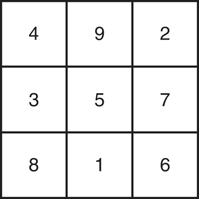
Figure 7-19 Lo Shu Magic Square The grid contains the numbers 1 through 9 exactly.
The sum of each row, each column, and each diagonal all add up to the same number. This is shown in Figure 7-20.
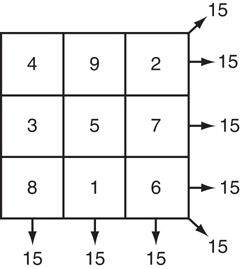
Figure 7-20 Sums of the rows, columns, and diagonals In a program, you can simulate a magic square using a two-dimensional array. Write a function that accepts a two-dimensional array as an argument, and determines whether the array is a Lo Shu Magic Square. Test the function in a program.
Payroll
Write a program that uses the following arrays:
empId: an array of seven long integers to hold employee identification numbers. The array should be initialized with the following numbers:5658845 4520125 7895122 8777541 8451277 1302850 7580489hours: an array of seven integers to hold the number of hours worked by each employeepayRate: an array of sevendoubles to hold each employee’s hourly pay ratewages: an array of sevendoubles to hold each employee’s gross wages
The program should relate the data in each array through the subscripts. For example, the number in element 0 of the
hoursarray should be the number of hours worked by the employee whose identification number is stored in element 0 of theempIdarray. That same employee’s pay rate should be stored in element 0 of thepayRatearray.The program should display each employee number and ask the user to enter that employee’s hours and pay rate. It should then calculate the gross wages for that employee (hours times pay rate) and store them in the
wagesarray. After the data has been entered for all the employees, the program should display each employee’s identification number and gross wages.Input Validation: Do not accept negative values for hours or numbers less than 15.00 for pay rate.
Driver’s License Exam
The local Driver’s License Office has asked you to write a program that grades the written portion of the driver’s license exam. The exam has 20 multiple-choice questions. Here are the correct answers:
1. A 6. B 11. A 16. C 2. D 7. A 12. C 17. C 3. B 8. B 13. D 18. A 4. B 9. C 14. B 19. D 5. C 10. D 15. D 20. B Your program should store the correct answers shown above in an array. It should ask the user to enter the student’s answers for each of the 20 questions, and the answers should be stored in another array. After the student’s answers have been entered, the program should display a message indicating whether the student passed or failed the exam. (A student must correctly answer 15 of the 20 questions to pass the exam.) It should then display the total number of correctly answered questions, the total number of incorrectly answered questions, and a list showing the question numbers of the incorrectly answered questions.
Input Validation: Only accept the letters A, B, C, or D as answers.
Exam Grader
One of your professors has asked you to write a program to grade her final exams, which consist of only 20 multiple-choice questions. Each question has one of four possible answers: A, B, C, or D. The file CorrectAnswers.txt contains the correct answers for all of the questions, with each answer written on a separate line. The first line contains the answer to the first question, the second line contains the answer to the second question, and so forth. (Download the book’s source code from the Computer Science Portal at www.pearsonhighered.com/gaddis. You will find the file in the Chapter 07 folder.)
Write a program that reads the contents of the CorrectAnswers.txt file into a
chararray, then reads the contents of another file, containing a student’s answers, into a secondchararray. (You can use the file StudentAnswers.txt for testing purposes. This file is also in the Chapter 07 source code folder.) The program should determine the number of questions that the student missed, then display the following:A list of the questions missed by the student, showing the correct answer and the incorrect answer provided by the student for each missed question
The total number of questions missed
The percentage of questions answered correctly. This can be calculated as
Correctly Answered Questions ÷ Total Number of Questions
If the percentage of correctly answered questions is 70 percent or greater, the program should indicate that the student passed the exam. Otherwise, it should indicate that the student failed the exam.
Grade Book
A teacher has five students who have taken four tests. The teacher uses the following grading scale to assign a letter grade to a student, based on the average of his or her four test scores:
Test Score Letter Grade 90–100 A 80–89 B 70–79 C 60–69 D 0–59 F Write a program that uses an array of
stringobjects to hold the five student names, an array of five characters to hold the five students’ letter grades, and five arrays of fourdoubles to hold each student’s set of test scores.The program should allow the user to enter each student’s name and his or her four test scores. It should then calculate and display each student’s average test score, and a letter grade based on the average.
Input Validation: Do not accept test scores less than 0 or greater than 100.
Grade Book Modification
Modify the grade book application in Programming Challenge 12 so it drops each student’s lowest score when determining the test score averages and letter grades.
Lottery Application
Write a program that simulates a lottery. The program should have an array of five integers named
lotteryand should generate a random number in the range of 0 through 9 for each element in the array. The user should enter five digits, which should be stored in an integer array nameduser. The program is to compare the corresponding elements in the two arrays and keep a count of the digits that match. For example, the following shows thelotteryarray and theuserarray with sample numbers stored in each. There are two matching digits (elements 2 and 4).Lottery array:
74913User array:
42973The program should display the random numbers stored in the
lotteryarray and the number of matching digits. If all of the digits match, display a message proclaiming the user as a grand prize winner.vectorModificationModify the National Commerce Bank case study presented in Program 7-23 so
pin1,pin2, andpin3arevectors instead of arrays. You must also modify thetestPINfunction to accept avectorinstead of an array.World Series Champions
If you have downloaded this book’s source code, you will find the following files in this chapter’s folder:
Teams.txt—This file contains a list of several Major League baseball teams in alphabetical order. Each team listed in the file has won the World Series at least once.
WorldSeriesWinners.txt—This file contains a chronological list of the World Series’ winning teams from 1903 to 2012. (The first line in the file is the name of the team that won in 1903, and the last line is the name of the team that won in 2012. Note the World Series was not played in 1904 or 1994.)
Write a program that displays the contents of the Teams.txt file on the screen and prompts the user to enter the name of one of the teams. The program should then display the number of times that team has won the World Series in the time period from 1903 to 2012.
 Tip:
Tip:Read the contents of the WorldSeriesWinners.txt file into an array or
vector. When the user enters the name of a team, the program should step through the array orvectorcounting the number of times the selected team appears.Name Search
If you have downloaded this book’s source code, you will find the following files in this chapter’s folder:
GirlNames.txt—This file contains a list of the 200 most popular names given to girls born in the United States from 2000 to 2009.
BoyNames.txt—This file contains a list of the 200 most popular names given to boys born in the United States from 2000 to 2009.
Write a program that reads the contents of the two files into two separate arrays or
vectors. The user should be able to enter a boy’s name, a girl’s name, or both, and the application should display messages indicating whether the names were among the most popular.Tic-Tac-Toe Game
Write a program that allows two players to play a game of tic-tac-toe. Use a two-dimensional
chararray with three rows and three columns as the game board. Each element of the array should be initialized with an asterisk (*). The program should run a loop that does the following:Displays the contents of the board array.
Allows player 1 to select a location on the board for an X. The program should ask the user to enter the row and column numbers.
Allows player 2 to select a location on the board for an O. The program should ask the user to enter the row and column numbers.
Determines whether a player has won, or a tie has occurred. If a player has won, the program should declare that player the winner and end. If a tie has occurred, the program should display an appropriate message and end.
Player 1 wins when there are three Xs in a row on the game board. The Xs can appear in a row, in a column, or diagonally across the board. Player 2 wins when there are three Os in a row on the game board. The Os can appear in a row, in a column, or diagonally across the board. A tie occurs when all of the locations on the board are full, but there is no winner.
Magic 8 Ball
Write a program that simulates a Magic 8 Ball, which is a fortune-telling toy that displays a random response to a yes or no question. In the student sample programs for this book, you will find a text file named 8_ball_responses.txt. The file contains 12 responses, such as “I don’t think so”, “Yes, of course!”, “I’m not sure”, and so forth. The program should read the responses from the file into an array or
vector. It should prompt the user to ask a question, and then display one of the responses, randomly selected from the array orvector. The program should repeat until the user is ready to quit.Contents of 8_ball_responses.txt:
Yes, of course!
Without a doubt, yes.
You can count on it.
For sure!
Ask me later.
I'm not sure.
I can't tell you right now.
I'll tell you after my nap.
No way!
I don't think so.
Without a doubt, no.
The answer is clearly NO.
1994 Gas Prices
In the student sample programs for this book, you will find a text file named 1994_Weekly_Gas_Averages.txt. The file contains the average gas price for each week in the year 1994 (There are 52 lines in the file. Line 1 contains the average price for week 1, line 2 contains the average price for week 2, and so forth.) Write a program that reads the gas prices from the file into an array or a
vector. The program should do the following:Display the lowest average price of the year, along with the week number for that price, and the name of the month in which it occurred.
Display the highest average price of the year, along with the week number for that price, and the name of the month in which it occurred.
Display the average gas price for each month. (To get the average price for a given month, calculate the average of the average weekly prices for that month.)
2D Array Operations
Write a program that creates a two-dimensional array initialized with test data. Use any data type you wish. The program should have the following functions:
getTotal—This function should accept a two-dimensional array as its argument and return the total of all the values in the array.getAverage—This function should accept a two-dimensional array as its argument and return the average of all the values in the array.getRowTotal—This function should accept a two-dimensional array as its first argument and an integer as its second argument. The second argument should be the subscript of a row in the array. The function should return the total of the values in the specified row.getColumnTotal—This function should accept a two-dimensional array as its first argument and an integer as its second argument. The second argument should be the subscript of a column in the array. The function should return the total of the values in the specified column.getHighestInRow—This function should accept a two-dimensional array as its first argument and an integer as its second argument. The second argument should be the subscript of a row in the array. The function should return the highest value in the specified row of the array.getLowestInRow—This function should accept a two-dimensional array as its first argument and an integer as its second argument. The second argument should be the subscript of a row in the array. The function should return the lowest value in the specified row of the array.
Demonstrate each of the functions in this program.
Group Project
Theater Seating
This program should be designed and written by a team of students. Here are some suggestions:
One student should design function
main, which will call the other functions in the program. The remainder of the functions will be designed by other members of the team.The requirements of the program should be analyzed so that each student is given about the same workload.
The parameters and return types of each function should be decided in advance.
The program can be implemented as a multi-file program, or all the functions can be cut and pasted into the main file.
Here is the assignment: Write a program that can be used by a small theater to sell tickets for performances. The theater’s auditorium has 15 rows of seats, with 30 seats in each row. The program should display a screen that shows which seats are available and which are taken. For example, the following screen shows a chart depicting each seat in the theater. Seats that are taken are represented by an * symbol, and seats that are available are represented by a # symbol.
                   Seats
         123456789012345678901234567890
Row 1    ***###***###*########*****####
Row 2    ####*************####*******##
Row 3    **###**********########****###
Row 4    **######**************##******
Row 5    ********#####*********########
Row 6    ##############************####
Row 7    #######************###########
Row 8    ************##****############
Row 9    #########*****############****
Row 10   #####*************############
Row 11   #**********#################**
Row 12   #############********########*
Row 13   ###***********########**######
Row 14   ##############################
Row 15   ##############################
Here is a list of tasks this program must perform:
When the program begins, it should ask the user to enter the seat prices for each row. The prices can be stored in a separate array. (Alternatively, the prices may be read from a file.)
Once the prices are entered, the program should display a seating chart similar to the one shown above. The user may enter the row and seat numbers for tickets being sold. Every time a ticket or group of tickets is purchased, the program should display the total ticket prices and update the seating chart.
The program should keep a total of all ticket sales. The user should be given an option of viewing this amount.
The program should also give the user an option to see a list of how many seats have been sold, how many seats are available in each row, and how many seats are available in the entire auditorium.
Input Validation: When tickets are being sold, do not accept row or seat numbers that do not exist. When someone requests a particular seat, the program should make sure that seat is available before it is sold.