Chapter 21 Binary Trees
21.1 Definition and Applications of Binary Trees
Concept:
A binary tree is a nonlinear linked structure in which each node may point to two other nodes, and every node but the root node has a single predecessor. Binary trees expedite the process of searching large sets of data.
A binary tree is a nonlinear linked structure where each node can point to two other nodes.
It’s organized like an upside-down tree, anchored by a tree pointer.
The first node is the root node, which has pointers to its child nodes.
A node with no children is a leaf node. Pointers that don’t point to a node are set to
nullptr.A subtree is a complete branch of the tree starting from a specific node.
Applications of Binary Trees
Binary trees are highly effective for searching large datasets, outperforming linear structures like arrays or linked lists.
They are often used in databases to organize key values. A binary tree used for searching is called a binary search tree.
In a binary search tree, data is stored in an ordered way:
- A node’s left child holds a value less than the node’s own value.
- A node’s right child holds a value greater than the node’s own value.
- This rule applies to all nodes in the tree.
To search the tree, an application starts at the root and branches left or right based on whether the search value is less than or greater than the current node’s value, continuing until the value is found.
Checkpoint
21.1 Describe the difference between a binary tree and a standard linked list.
21.2 What is a root node?
21.3 What is a child node?
21.4 What is a leaf node?
21.5 What is a subtree?
21.6 Why are binary trees suitable for algorithms that must search large amounts of data?
21.2 Binary Search Tree Operations
Concept:
Many operations may be performed on a binary search tree. In this section, we will discuss creating a binary search tree and inserting, finding, and deleting nodes.
- This section covers basic operations on a binary search tree using an
IntBinaryTreeclass for storing integers.
Creating a Binary Trees
- The tree’s nodes are based on the following
TreeNodestructure.
struct TreeNode
{
    int value;
    TreeNode *left;
    TreeNode *right;
};- The
IntBinaryTreeclass declaration is shown below. It includes arootpointer to the first node and private member functions for core operations.
Contents of IntBinaryTree.h
 #ifndef INTBINARYTREE_H
 #define INTBINARYTREE_H

 class IntBinaryTree
 {
 private:
     struct TreeNode
     {
         int value;
         TreeNode *left;
         TreeNode *right;
     };

     TreeNode *root;

     void insert(TreeNode *&, TreeNode *&);
     void destroySubTree(TreeNode *);
     void deleteNode(int, TreeNode *&);
     void makeDeletion(TreeNode *&);
     void displayInOrder(TreeNode *) const;
     void displayPreOrder(TreeNode *) const;
     void displayPostOrder(TreeNode *) const;

 public:
     IntBinaryTree()
         { root = nullptr; }

     ~IntBinaryTree()
         { destroySubTree(root); }

     void insertNode(int);
     bool searchNode(int);
     void remove(int);

     void displayInOrder() const
         { displayInOrder(root); }

     void displayPreOrder() const
         { displayPreOrder(root); }

     void displayPostOrder() const
         { displayPostOrder(root); }
 };
 #endif
Inserting a Node
Inserting a Node in a Binary Tree
- The public
insertNodefunction is used to add a new value to the tree.- It creates a new
TreeNode. - It sets the new node’s
leftandrightpointers tonullptr, as new nodes are always added as leaves. - It then calls the private
insertfunction to place the node in the correct position.
- It creates a new
- The private
insertfunction recursively finds the correct insertion point.- Its first parameter,
nodePtr, is a reference to a pointer (TreeNode *&). This allows the function to modify the actual pointer in the tree, not just a copy. - If
nodePtrisnullptr, the end of a branch has been reached, and the new node is inserted there. - Otherwise, the function recursively calls itself on the left subtree if the new value is smaller or the right subtree if it’s larger.
- Its first parameter,
- The following program demonstrates creating a tree and inserting nodes.
🗊 Program 21-1
- The tree structure created by this program is shown below.
Note:
The shape of the tree is determined by the order in which the values are inserted. The root node in the diagram above holds the value 5 because that was the first value inserted. By stepping through the function, you can see how the other nodes came to appear in their depicted positions.
Note:
If the new value being inserted into the tree is equal to an existing value, the insertion algorithm inserts it to the right of the existing value.
Traversing the Tree
There are three common recursive methods for traversing a binary tree:
Inorder traversal:
- Traverse the left subtree.
- Process the current node’s data.
- Traverse the right subtree.
Preorder traversal:
- Process the current node’s data.
- Traverse the left subtree.
- Traverse the right subtree.
Postorder traversal:
- Traverse the left subtree.
- Traverse the right subtree.
- Process the current node’s data.
The
IntBinaryTreeclass provides public functions that initiate these traversals by calling private recursive functions, starting from the root.
void displayInOrder() const
{ displayInOrder(root); }
void displayPreOrder() const
{ displayPreOrder(root); }
void displayPostOrder() const
{ displayPostOrder(root); }- The private recursive functions for traversal are shown here.
void IntBinaryTree::displayInOrder(TreeNode *nodePtr) const
{
if (nodePtr)
{
displayInOrder(nodePtr->left);
cout << nodePtr->value << endl;
displayInOrder(nodePtr->right);
}
}
void IntBinaryTree::displayPreOrder(TreeNode *nodePtr) const
{
if (nodePtr)
{
cout << nodePtr->value << endl;
displayPreOrder(nodePtr->left);
displayPreOrder(nodePtr->right);
}
}
void IntBinaryTree::displayPostOrder(TreeNode *nodePtr) const
{
if (nodePtr)
{
displayPostOrder(nodePtr->left);
displayPostOrder(nodePtr->right);
cout << nodePtr->value << endl;
}
}- The following program demonstrates all three traversal methods.
🗊 Program 21-2
#include <iostream>
#include "IntBinaryTree.h"
using namespace std;
int main()
{
IntBinaryTree tree;
cout << "Inserting nodes.\n";
tree.insertNode(5);
tree.insertNode(8);
tree.insertNode(3);
tree.insertNode(12);
tree.insertNode(9);
cout << "Inorder traversal:\n";
tree.displayInOrder();
cout << "\nPreorder traversal:\n";
tree.displayPreOrder();
cout << "\nPostorder traversal:\n";
tree.displayPostOrder();
return 0;
}💻 Program Output
Searching the Tree
The
searchNodefunction returnstrueif a value is in the tree andfalseotherwise.It works by starting at the root and moving through the tree, comparing the search value to each node’s value to decide whether to go left or right.
- This program demonstrates the search function.
🗊 Program 21-3
#include <iostream>
#include "IntBinaryTree.h"
using namespace std;
int main()
{
IntBinaryTree tree;
cout << "Inserting nodes.\n";
tree.insertNode(5);
tree.insertNode(8);
tree.insertNode(3);
tree.insertNode(12);
tree.insertNode(9);
if (tree.searchNode(3))
cout << "3 is found in the tree.\n";
else
cout << "3 was not found in the tree.\n";
if (tree.searchNode(100))
cout << "100 is found in the tree.\n";
else
cout << "100 was not found in the tree.\n";
return 0;
}💻 Program Output
Deleting a Node
- Deleting a node requires preserving any subtrees attached to it.
Deleting a Node from a Binary Tree
- There are two complex scenarios for deletion:
- The node has one child: The child’s subtree is attached to the deleted node’s parent.
- **The node has two children**: The node's right subtree is attached to the parent, and then the left subtree is attached to an appropriate position within the right subtree.- The public
removefunction initiates the deletion process by calling the privatedeleteNodefunction.
- The
deleteNodefunction recursively searches for the node to be deleted. Once found, it callsmakeDeletionto perform the actual removal and tree restructuring.
- The
makeDeletionfunction handles the three cases: the node is a leaf, has one child, or has two children, and correctly reattaches any subtrees before freeing the node’s memory.
void IntBinaryTree::makeDeletion(TreeNode *&nodePtr)
{
TreeNode *tempNodePtr = nullptr;
if (nodePtr == nullptr)
cout << "Cannot delete empty node.\n";
else if (nodePtr->right == nullptr)
{
tempNodePtr = nodePtr;
nodePtr = nodePtr->left;
delete tempNodePtr;
}
else if (nodePtr->left == nullptr)
{
tempNodePtr = nodePtr;
nodePtr = nodePtr->right;
delete tempNodePtr;
}
else
{
tempNodePtr = nodePtr->right;
while (tempNodePtr->left)
tempNodePtr = tempNodePtr->left;
tempNodePtr->left = nodePtr->left;
tempNodePtr = nodePtr;
nodePtr = nodePtr->right;
delete tempNodePtr;
}
}- The following program demonstrates node deletion.
🗊 Program 21-4
#include <iostream>
#include "IntBinaryTree.h"
using namespace std;
int main()
{
IntBinaryTree tree;
cout << "Inserting nodes.\n";
tree.insertNode(5);
tree.insertNode(8);
tree.insertNode(3);
tree.insertNode(12);
tree.insertNode(9);
cout << "Here are the values in the tree:\n";
tree.displayInOrder();
cout << "Deleting 8. . .\n";
tree.remove(8);
cout << "Deleting 12. . .\n";
tree.remove(12);
cout << "Now, here are the nodes:\n";
tree.displayInOrder();
return 0;
}💻 Program Output
- The complete implementation file is provided for reference.
Contents of IntBinaryTree.cpp
#include <iostream>
#include "IntBinaryTree.h"
using namespace std;
void IntBinaryTree::insert(TreeNode *&nodePtr, TreeNode *&newNode)
{
if (nodePtr == nullptr)
nodePtr = newNode;
else if (newNode->value < nodePtr->value)
insert(nodePtr->left, newNode);
else
insert(nodePtr->right, newNode);
}
 void IntBinaryTree::insertNode(int num)
 {
     TreeNode *newNode = nullptr;

     newNode = new TreeNode;
     newNode->value = num;
     newNode->left = newNode->right = nullptr;

     insert(root, newNode);
 }
void IntBinaryTree::destroySubTree(TreeNode *nodePtr)
{
if (nodePtr)
{
if (nodePtr->left)
destroySubTree(nodePtr->left);
if (nodePtr->right)
destroySubTree(nodePtr->right);
delete nodePtr;
}
}
bool IntBinaryTree::searchNode(int num)
{
TreeNode *nodePtr = root;
while (nodePtr)
{
if (nodePtr->value == num)
return true;
else if (num < nodePtr->value)
nodePtr = nodePtr->left;
else
nodePtr = nodePtr->right;
}
return false;
}
void IntBinaryTree::remove(int num)
{
deleteNode(num, root);
}
void IntBinaryTree::deleteNode(int num, TreeNode *&nodePtr)
{
if (num < nodePtr->value)
deleteNode(num, nodePtr->left);
else if (num > nodePtr->value)
deleteNode(num, nodePtr->right);
else
makeDeletion(nodePtr);
}
void IntBinaryTree::makeDeletion(TreeNode *&nodePtr)
{
TreeNode *tempNodePtr = nullptr;
if (nodePtr == nullptr)
cout << "Cannot delete empty node.\n";
else if (nodePtr->right == nullptr)
{
tempNodePtr = nodePtr;
nodePtr = nodePtr->left;
delete tempNodePtr;
}
else if (nodePtr->left == nullptr)
{
tempNodePtr = nodePtr;
nodePtr = nodePtr->right;
delete tempNodePtr;
}
else
{
tempNodePtr = nodePtr->right;
while (tempNodePtr->left)
tempNodePtr = tempNodePtr->left;
tempNodePtr->left = nodePtr->left;
tempNodePtr = nodePtr;
nodePtr = nodePtr->right;
delete tempNodePtr;
}
}
void IntBinaryTree::displayInOrder(TreeNode *nodePtr) const
{
if (nodePtr)
{
displayInOrder(nodePtr->left);
cout << nodePtr->value << endl;
displayInOrder(nodePtr->right);
}
}
void IntBinaryTree::displayPreOrder(TreeNode *nodePtr) const
{
if (nodePtr)
{
cout << nodePtr->value << endl;
displayPreOrder(nodePtr->left);
displayPreOrder(nodePtr->right);
}
}
void IntBinaryTree::displayPostOrder(TreeNode *nodePtr) const
{
if (nodePtr)
{
displayPostOrder(nodePtr->left);
displayPostOrder(nodePtr->right);
cout << nodePtr->value << endl;
}
}Checkpoint
21.7 Describe the sequence of events in an inorder traversal.
21.8 Describe the sequence of events in a preorder traversal.
21.9 Describe the sequence of events in a postorder traversal.
21.10 Describe the steps taken in deleting a leaf node.
21.11 Describe the steps taken in deleting a node with one child.
21.12 Describe the steps taken in deleting a node with two children.
21.3 Template Considerations for Binary Search Trees
Concept:
Binary search trees may be implemented as templates, but any data types used with them must support the <, >, and == operators.
When creating a binary tree template, it is crucial that any data type stored in the tree supports the comparison operators
<,>, and==.If you intend to store class objects in the tree, these operators must be overloaded for that class.
The code below shows a binary tree template that can work with different data types, such as strings.
Contents of BinaryTree.h
#ifndef BINARYTREE_H
#define BINARYTREE_H
#include <iostream>
using namespace std;
template <class T>
class BinaryTree
{
private:
struct TreeNode
{
T value;
TreeNode *left;
TreeNode *right;
};
TreeNode *root;
void insert(TreeNode *&, TreeNode *&);
void destroySubTree(TreeNode *);
void deleteNode(T, TreeNode *&);
void makeDeletion(TreeNode *&);
void displayInOrder(TreeNode *) const;
void displayPreOrder(TreeNode *) const;
void displayPostOrder(TreeNode *) const;
public:
BinaryTree()
{ root = nullptr; }
~BinaryTree()
{ destroySubTree(root); }
void insertNode(T);
bool searchNode(T);
void remove(T);
void displayInOrder() const
   { displayInOrder(root); }
void displayPreOrder() const
   { displayPreOrder(root); }
void displayPostOrder() const
   { displayPostOrder(root); }
};
template <class T>
void BinaryTree<T>::insert(TreeNode *&nodePtr, TreeNode *&newNode)
{
if (nodePtr == nullptr)
nodePtr = newNode;
else if (newNode->value < nodePtr->value)
insert(nodePtr->left, newNode);
else
insert(nodePtr->right, newNode);
}
template <class T>
void BinaryTree<T>::insertNode(T item)
{
TreeNode *newNode = nullptr;
newNode = new TreeNode;
newNode->value = item;
newNode->left = newNode->right = nullptr;
insert(root, newNode);
}
template <class T>
void BinaryTree<T>::destroySubTree(TreeNode *nodePtr)
{
if (nodePtr)
{
if (nodePtr->left)
destroySubTree(nodePtr->left);
if (nodePtr->right)
destroySubTree(nodePtr->right);
delete nodePtr;
}
}
template <class T>
bool BinaryTree<T>::searchNode(T item)
{
TreeNode *nodePtr = root;
while (nodePtr)
{
if (nodePtr->value == item)
return true;
else if (item < nodePtr->value)
nodePtr = nodePtr->left;
else
nodePtr = nodePtr->right;
}
return false;
}
template <class T>
void BinaryTree<T>::remove(T item)
{
deleteNode(item, root);
}
template <class T>
void BinaryTree<T>::deleteNode(T item, TreeNode *&nodePtr)
{
if (item < nodePtr->value)
deleteNode(item, nodePtr->left);
else if (item > nodePtr->value)
deleteNode(item, nodePtr->right);
else
makeDeletion(nodePtr);
}
template <class T>
void BinaryTree<T>::makeDeletion(TreeNode *&nodePtr)
{
TreeNode *tempNodePtr = nullptr;
if (nodePtr == nullptr)
cout << "Cannot delete empty node.\n";
else if (nodePtr->right == nullptr)
{
tempNodePtr = nodePtr;
nodePtr = nodePtr->left;
delete tempNodePtr;
}
else if (nodePtr->left == nullptr)
{
tempNodePtr = nodePtr;
nodePtr = nodePtr->right;
delete tempNodePtr;
}
else
{
tempNodePtr = nodePtr->right;
while (tempNodePtr->left)
tempNodePtr = tempNodePtr->left;
tempNodePtr->left = nodePtr->left;
tempNodePtr = nodePtr;
nodePtr = nodePtr->right;
delete tempNodePtr;
}
}
template <class T>
void BinaryTree<T>::displayInOrder(TreeNode *nodePtr) const
{
if (nodePtr)
{
displayInOrder(nodePtr->left);
cout << nodePtr->value << endl;
displayInOrder(nodePtr->right);
}
}
template <class T>
void BinaryTree<T>::displayPreOrder(TreeNode *nodePtr) const
{
if (nodePtr)
{
cout << nodePtr->value << endl;
displayPreOrder(nodePtr->left);
displayPreOrder(nodePtr->right);
}
}
template <class T>
void BinaryTree<T>::displayPostOrder(TreeNode *nodePtr) const
{
if (nodePtr)
{
displayPostOrder(nodePtr->left);
displayPostOrder(nodePtr->right);
cout << nodePtr->value << endl;
}
}
#endif- The following program demonstrates using the template to create a binary tree of strings.
🗊 Program 21-5
 #include <iostream>
 #include "BinaryTree.h"
 using namespace std;

 const int NUM_NODES = 5;

 int main()
 {
     string name;

     BinaryTree<string> tree;

     for (int count = 0; count < NUM_NODES; count++)
     {
         cout << "Enter a name: ";
         getline(cin, name);
         tree.insertNode(name);
     }

     cout << "\nHere are the values in the tree:\n";
     tree.displayInOrder();
     return 0;
 }
💻 Program Output
Review Questions and Exercises
Short Answer
Each node in a binary tree may point to how many other nodes?
How many predecessors may each node other than the root node have?
What is a leaf node?
What is a subtree?
What initially determines the shape of a binary tree?
What are the three methods of traversing a binary tree? What is the difference between these methods?
Fill-in-the-Blank
The first node in a binary tree is called the _______________.
A binary tree node’s left and right pointers point to the node’s _______________.
A node with no children is called a(n) _______________.
A(n) _______________ is an entire branch of the tree, from one particular node down.
The three common types of traversal with a binary tree are _______________, _______________, and _______________.
Algorithm Workbench
Write a pseudocode algorithm for inserting a node in a tree.
Write a pseudocode algorithm for the inorder traversal.
Write a pseudocode algorithm for the preorder traversal.
Write a pseudocode algorithm for the postorder traversal.
Write a pseudocode algorithm for searching a tree for a specified value.
Suppose the following values are inserted into a binary tree, in the order given:
12, 7, 9, 10, 22, 24, 30, 18, 3, 14, 20
Draw a diagram of the resulting binary tree.
How would the values in the tree you sketched for Question 17 be displayed in an inorder traversal?
How would the values in the tree you sketched for Question 17 be displayed in a preorder traversal?
How would the values in the tree you sketched for Question 17 be displayed in a postorder traversal?
True or False
T F Each node in a binary tree must have at least two children.
T F When a node is inserted into a tree, it must be inserted as a leaf node.
T F Values stored in the current node’s left subtree are less than the value stored in the current node.
T F The shape of a binary tree is determined by the order in which values are inserted.
T F In inorder traversal, the node’s data is processed first, then the left and right nodes are visited.
Programming Challenges
Binary Tree Template
Write your own version of a class template that will create a binary tree that can hold values of any data type. Demonstrate the class with a driver program.
Node Counter
Write a member function, for either the template you designed in Programming Challenge 1 or the
IntBinaryTreeclass, that counts and returns the number of nodes in the tree. Demonstrate the function in a driver program.
Solving the Node Counter Problem
Leaf Counter
Write a member function, for either the template you designed in Programming Challenge 1 or the
IntBinaryTreeclass, that counts and returns the number of leaf nodes in the tree. Demonstrate the function in a driver program.Tree Height
Write a member function, for either the template you designed in Programming Challenge 1 or the
IntBinaryTreeclass, that returns the height of the tree. The height of the tree is the number of levels it contains. For example, the tree shown in Figure 21-10 has three levels.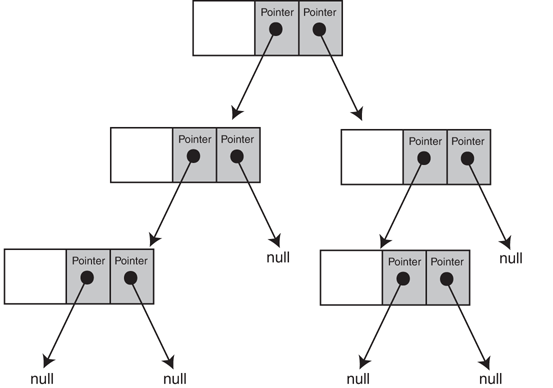
Figure 21-10 A tree with three levels Demonstrate the function in a driver program.
Tree Width
Write a member function, for either the template you designed in Programming Challenge 1 or the
IntBinaryTreeclass, that returns the width of the tree. The width of the tree is the largest number of nodes in the same level. Demonstrate the function in a driver program.Tree Assignment Operators, Copy Constructors, and Move Constructors
Design an overloaded copy assignment operator, a move assignment operator, a copy constructor, and a move constructor for either the template you designed in Programming Challenge 1 or the
IntBinaryTreeclass. Demonstrate them in a driver program.Queue Converter
Write a program that stores a series of numbers in a binary tree. Then have the program insert the values into a queue in ascending order. Dequeue the values and display them on the screen to confirm that they were stored in the proper order.
Employee Tree
Design an
EmployeeInfoclass that holds the following employee information:Employee ID Number: an integer Employee Name: a string Next, use the template you designed in Programming Challenge 1 (Binary Tree Template) to implement a binary tree whose nodes hold an instance of the
EmployeeInfoclass. The nodes should be sorted on the Employee ID number.Test the binary tree by inserting nodes with the following information.
Employee ID Number Name 1021 John Williams 1057 Bill Witherspoon 2487 Jennifer Twain 3769 Sophia Lancaster 1017 Debbie Reece 1275 George McMullen 1899 Ashley Smith 4218 Josh Plemmons Your program should allow the user to enter an ID number, then search the tree for the number. If the number is found, it should display the employee’s name. If the node is not found, it should display a message indicating so.